Telephone and video conferencing is a great way to communicate with people simultaneously from different locations. The most typical use is for a group meeting, faculty presentation, job interview, or research collaboration. Carleton has three teleconference tools available, two are free and one has a per minute/per participant charge billed to the department conducting the meeting.
Google Hangouts Meet is a free service and can be used for either telephone or for video conferencing. It is integrated directly into Google Calendar and can be added to any meeting by clicking “add conferencing” when sending a Google Calendar invite. Here is a video and written instructions about how to schedule a Google hangouts meeting. This video gives an overview of the interface.
If you only want to use the telephone feature for your conference call, your participants can just call the number on the invite as shown in the highlighted portion of the calendar invitation below.

Recommendation for use: Google Hangouts Meet can be used as an easy and effective way to connect with anyone, but works especially well for connecting Carleton faculty, staff, and students. It’s an excellent “casual connect” tool for either telephone or video conferencing for up to 10 participants.
Zoom has a free basic account and the College will have a campus-wide license for Zoom Pro very soon. Information about getting setup with a Zoom Pro license is forthcoming. Zoom basic or pro account can be used for telephone or video conferencing. It is a professional-level video conferencing tool available to anyone. Faculty, staff, and students can create a free “Basic” Zoom account. Here is a video and written instructions about getting started with Zoom. Once you have your account set up you can watch this video to learn how to schedule a meeting. If you only want to use the telephone feature for your conference call, your participants can just call one of the numbers listed in the Zoom meeting invitation below. Your participants will be asked for the meeting ID which also is found in the Zoom invitation.
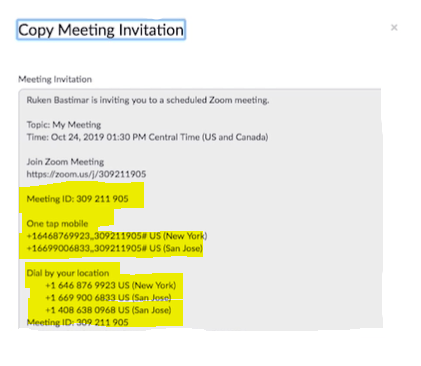
To learn more about conducting the scheduled meeting watch this video. To learn more about recording your meeting watch this video.
Recommended use: Zoom Basic can be used for extended one-on-one meetings, short calls with multiple people or creating instructional videos from your computer. You can host up to 100 participants but are limited to 40 minutes per meeting.
A “Zoom Pro” account can be used to schedule department conference calls, interviews, and other high-level meetings with up to 100 participants. The meeting duration limit is 24 hours. Over the summer, each academic department’s administrative assistant was given a Zoom Pro account. Others who need these Pro features should reach out to PEPS at x7070 or peps@carleton.edu to be put on the request list for a Zoom Pro account. The directions for scheduling and recording a meeting are exactly the same as the Zoom basic account. You can also just use the dial in portion of the meeting if you don’t require video.
Recommended use: Zoom Pro can be used for high-level meetings, screen recording and instructional continuity. You can have up to100 attendees and the meeting duration limit is 24 hours.
The College has three telephone conference lines through Intrado Teleconference Service. This option is NOT a free service and can be used just for telephone conference calls. It offers a dedicated 800 number and conference ID for participants in the conference. There is an option for recording the meeting for an additional charge. ITS needs a minimum of 24 hours’ notice prior to your meeting and you will need to email us at telecom@carleton.edu or call the Helpdesk at extension 5999 to reserve the conference line. You will need to provide the date, time and duration of the meeting along with the budget code that should be charged. Once you have reserved the conference lined you will be sent the instructions for the leader and participants for calling into the meeting. This service costs $.21 per minute/per participant for US calls and $.25 per minute/per participant for International calls.
Recommended use: Intrado teleconference lines can be used for special high-level meetings that require an 800 number.
Additional Services: PEPS office has one video conference room that can hold up to five participants and is located in Weitz Room 31. If you would like to reserve this room or you would like PEPS assistance with your video conference call, please submit a PEPS request using our online request forms. Allow at least 48 hours for us to process your request.
Please click here to view the classrooms that are video conference ready: Equipment in Rooms. To reserve a classroom, please contact Campus Scheduling at ext.7185 or submit an online reservation
Note: We would prefer that you try to schedule a classroom that has video conferencing equipment but if none are available, we can setup the necessary equipment if the room has an installed projection system.